
Dental lab · Case log
How to keep track of dental lab cases
Log every job as it comes in, with its due date, its technician and the next step. Each morning, the sheet tells you what ships today and what's late.
The guide
Keep the log in three steps.
Example · Morning check
Check the due dates every morning.
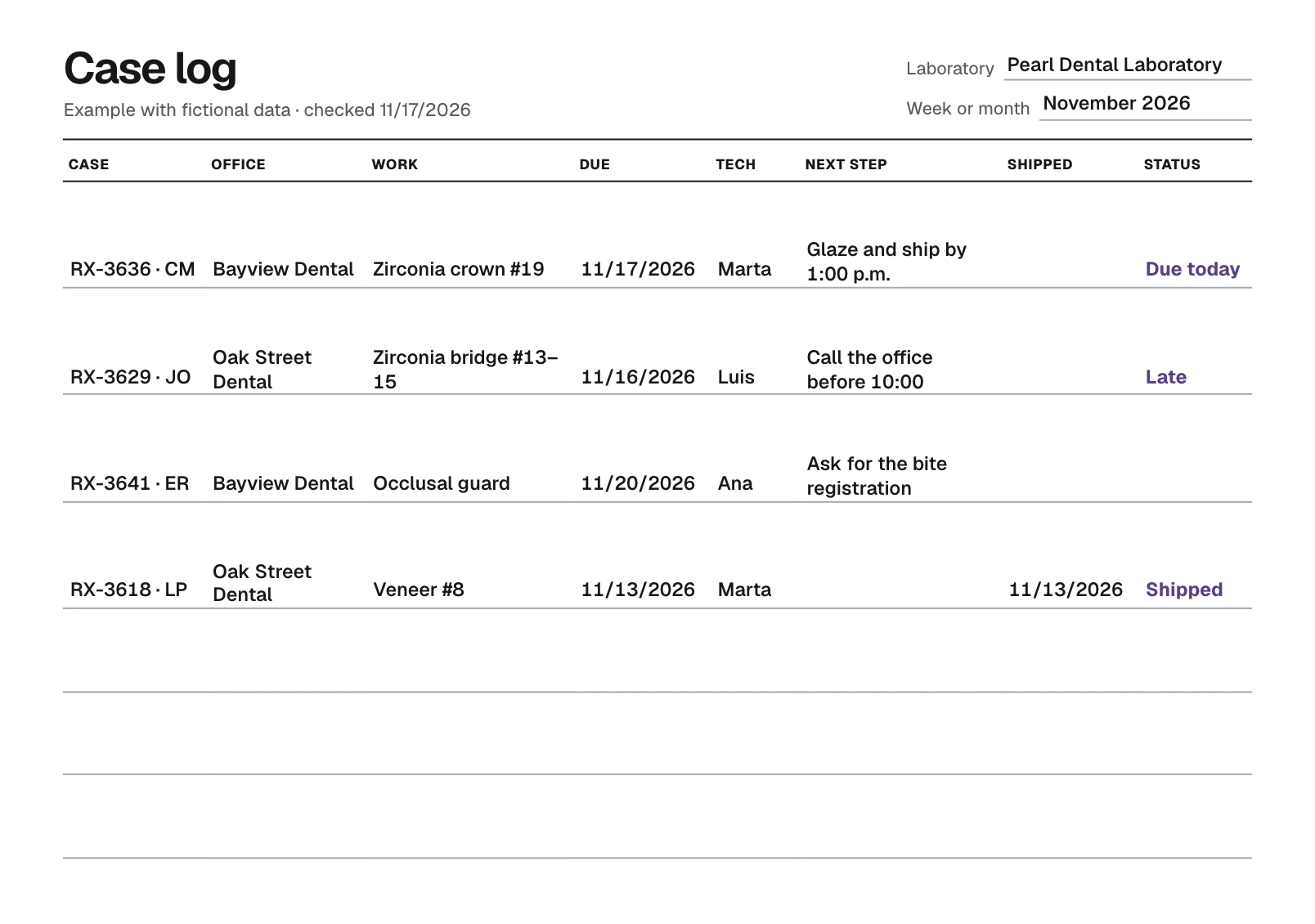
It's 8:30 on Tuesday, November 17. Before work starts, Pearl Dental Laboratory goes through its three open jobs.
Clara's crown on #19 is due today. Marta glazes it this morning and packs it for the 1:00 p.m. courier.
The bridge should have shipped yesterday. Luis calls the office before patients arrive, agrees on a new date and writes it under Due.
The guard is due Friday, but the bite registration hasn't arrived. Ana asks for it today so the remaining days aren't lost.
Pearl Dental Laboratory
Open this morning
Due today
Zirconia crown #19
- Due
- 11/17/2026
- Tech
- Marta
- Next step
- Glaze and ship by 1:00 p.m.
Late
Zirconia bridge #13–15
- Due
- 11/16/2026
- Tech
- Luis
- Next step
- Call the office before 10:00
Missing something
Occlusal guard
- Due
- 11/20/2026
- Tech
- Ana
- Next step
- Ask for the bite registration
Once the crown ships, Marta writes 11/17/2026 under Shipped and the line is closed.
The template
Type on the sheet.
One line per job, as soon as the box or the scan arrives. If the due date has passed and the case hasn't shipped, the sheet marks it late.
Open0
Late0
Blank 4
Without a due date, the sheet can't warn you about a late case.
Tracking cases on the Workbench takes an account. Create an account
Workbench
Assign each case to its technician.
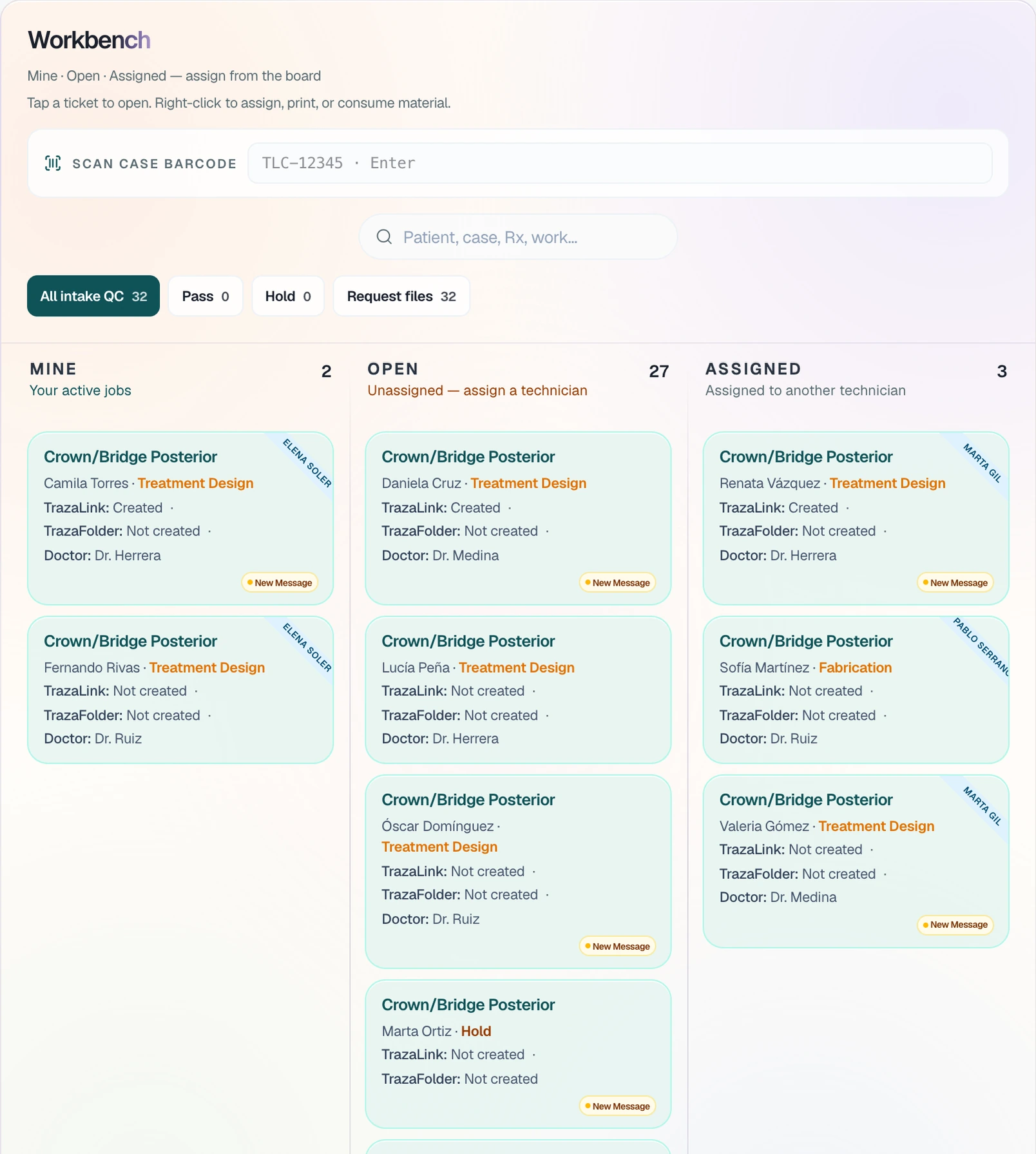
With an account, every case lands on the lab's Workbench with its patient, its work and its stage. What you type in the sheet doesn't carry over to the account.
Open holds the cases with no technician. Under Assigned, each ticket carries the name of the person making it.
On the case's Laboratory tab, Next step says what's missing and Fabrication status shows each part.
Questions
Before you print it.
The case number with the patient's initials, the office, the work, the due date, the technician and the next step. The ship date closes the line.
Once a day, before work starts. Look first at what's due today and what's late, then at what's stuck waiting on the office.
Write the due date as MM/DD/YYYY. If it has passed and the Shipped column is empty, the line is marked late, using your computer's date.
Yes. Print blank gives you the sheet with empty columns, on Letter or A4, to fill in by hand.
It's free, with no account, and what you type stays in your browser: it isn't sent to TrazaLab and it's cleared when you reload. Save it as a PDF.
Track your cases on the Workbench.
Create an account so every case lands on the Workbench, assigned to its technician and with its next step.