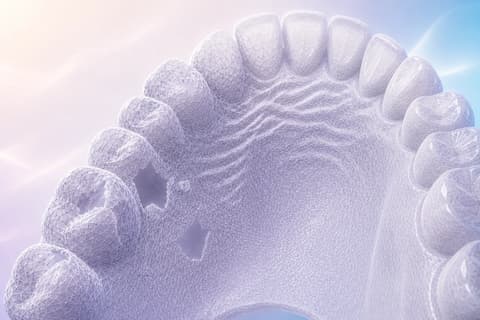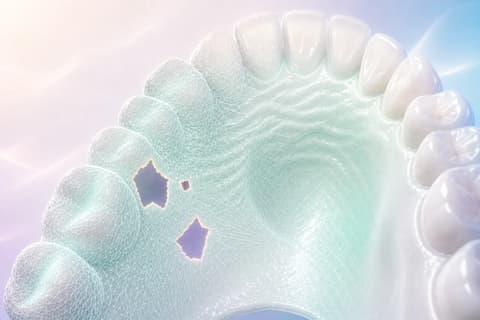
Free mesh repair — no signup required

Fix Damaged STL Files in Seconds — Free Online Repair Tool

Detect inverted normals, non-manifold edges, degenerate triangles, holes, and self-intersections. Get an A-F mesh grade, auto-repair with one click, and export a clean file.

8 Mesh Analysis Capabilities Built for Dental Files

Most repair tools were designed for 3D printing hobbyists. TrazaLab targets dental scan quality specifically.

🔍

Inverted Normal Detection

Identifies triangles with flipped normals that cause rendering artifacts and slicing errors. Auto-repair reorients them to match neighboring face direction.

Non-Manifold Edge Repair

Finds edges shared by more than two faces or single-face edges that break watertightness. Critical for CAM software that requires manifold meshes for toolpath generation.

📐

Degenerate Triangle Removal

Detects zero-area and sliver triangles that cause numerical instability in downstream CAD operations. Removes or reconstructs them while preserving surface continuity.

🕳

Hole Detection & Filling

Maps all open boundaries in the mesh and fills them using curvature-aware interpolation. Preserves dental anatomy detail while restoring watertightness.

A-F Mesh Grading

Comprehensive quality score evaluating watertightness, normal consistency, triangle quality, manifold status, and geometric integrity. Grade A means the file is print and mill ready.

🔄

Self-Intersection Cleanup

Detects faces that pass through each other, which causes boolean operation failures in CAD. Resolves intersections by local remeshing of affected regions.

🧹

Duplicate & Fragment Removal

Merges duplicate vertices within tolerance, removes isolated floating fragments, and cleans up scan artifacts that add file size without contributing to the model.

📊

Before/After Deviation Report

After repair, generates a deviation map showing exactly what changed. Verify that auto-repair preserved critical anatomy before exporting the fixed file.

Diagnose, Repair, and Export in 3 Steps

1

Upload Your STL File

Drag and drop or browse for your file. Supports binary and ASCII STL, OBJ, and PLY up to 200MB. Processing happens entirely in your browser.

2

Review the Diagnosis

Get an instant A-F mesh grade with a detailed breakdown of every error type found. Errors are highlighted directly on the 3D model in color-coded overlays.

3

Auto-Repair & Export

Click repair to fix all detected issues automatically. Review the deviation report, confirm the result, and export as binary STL, ASCII STL, or OBJ.

TrazaLab vs. Other STL Repair Tools

No install, no account, no file uploads to external servers.

FeatureTrazaLabMeshmixerNetfabb (free)MakePrintable
Runs in browser (no install)
100% client-side processing
A-F mesh quality grading
Dental-specific optimization
Before/after deviation report
Auto-repair with one click
No account required
Files up to 200MB

Understanding STL Mesh Errors — And Why They Matter for Dental Fabrication

An STL file looks fine in a viewer. The shape is recognizable, the colors are right, and nothing seems broken. Then you send it to your milling machine or 3D printer, and the software refuses to process it. Or worse, it processes it silently, and the fabricated restoration has a void, a rough patch, or a dimensional error that only becomes visible after sintering. The culprit is almost always mesh quality — and dental professionals lose hours every week chasing these invisible defects.

What Makes an STL File "Broken"?

An STL file encodes a 3D surface as a collection of triangles. For the file to be valid, those triangles must form a closed, consistent, non-overlapping surface — what mathematicians call a 2-manifold. In practice, this means every edge must be shared by exactly two triangles, every triangle must have a consistent outward-facing normal, and no triangles can pass through each other.

When these rules are violated, you get mesh errors. They fall into several categories, each with different consequences for dental fabrication:

  • Inverted normals: Some triangles face inward instead of outward. Slicing software cannot determine which side is "inside" and which is "outside" the restoration, leading to missing or inverted regions in toolpaths.
  • Non-manifold edges: An edge shared by three or more triangles, or an edge belonging to only one triangle. This creates an ambiguous surface topology that CAM software cannot resolve.
  • Holes and open boundaries: Gaps in the mesh surface where triangles are missing. The model is not watertight, which is a hard requirement for milling toolpath generation and 3D print slicing.
  • Degenerate triangles: Triangles with zero area (all three vertices collinear) or extreme aspect ratios (very long and thin). These cause numerical precision errors in downstream calculations.
  • Self-intersections: Triangles that pass through other triangles, creating impossible geometry. Boolean operations (like subtracting a cavity from a block) fail catastrophically on self-intersecting meshes.

Why Dental Scans Are Especially Prone to Errors

Intraoral scanners reconstruct 3D surfaces from a stream of overlapping image frames. The stitching algorithms do a remarkable job, but they are not perfect. Areas of low contrast (polished enamel, translucent margins), high saliva flow, or rapid patient movement can produce scan artifacts. These artifacts manifest as mesh errors in the exported STL.

Certain anatomical features are particularly error-prone. Deep subgingival margins often produce non-manifold geometry because the scanner cannot fully resolve the tissue boundary. Interproximal contacts generate self-intersections when adjacent teeth are scanned from slightly inconsistent angles. And the transition from hard tissue to soft tissue frequently creates degenerate triangles where the scanner struggled with material boundary detection.

Many clinicians are unaware of these errors because their scanner's built-in viewer hides them. The viewer uses tolerance-based rendering that smooths over minor defects. But when the STL is exported and sent to a lab, the defects travel with it. The lab's CAD software has stricter geometry requirements, and suddenly a scan that looked perfect in the clinic becomes unprocessable in the lab.

The A-F Grading System Explained

TrazaLab assigns a letter grade based on five weighted criteria. Watertightness (30%) checks whether the mesh forms a closed surface with no open boundaries. Normal consistency (20%) verifies that all triangle normals point outward. Triangle quality (20%) evaluates aspect ratios and degenerate elements. Manifold status (15%) confirms that every edge has exactly two adjacent faces. Geometric integrity (15%) checks for self-intersections and duplicate geometry.

A grade of A means the file is ready for CAM processing without any modification. Grade B means minor issues exist that are unlikely to affect fabrication but should be noted. Grade C means the file will likely process but may produce suboptimal results. Grade D means at least one issue will cause problems in most CAM workflows. Grades E and F indicate critical structural defects that will prevent processing entirely.

How Auto-Repair Preserves Dental Anatomy

The biggest fear dental professionals have with automated mesh repair is that it will alter critical surfaces. A margin line that shifts by 50 microns is clinically significant. TrazaLab's repair engine was designed with this constraint in mind.

Normal correction does not move any vertices — it only flips the direction of triangle normals. Duplicate removal merges vertices that are already within machine tolerance (typically 1 micron or less). Fragment removal only deletes disconnected geometry that is not part of the main model. Hole filling is the only operation that adds new geometry, and it uses curvature-aware interpolation that follows the shape of the surrounding mesh rather than flat-filling.

After every repair, TrazaLab generates a before/after deviation map. This color-coded overlay shows exactly which vertices moved and by how much. If any critical surface was altered beyond an acceptable threshold, you can revert the repair and address that specific area manually. Transparency is the design principle — you should never have to trust that the repair was safe. You can verify it.

When Auto-Repair Is Not Enough

Some mesh defects require human judgment. A large hole in the scan data cannot be filled automatically because TrazaLab has no way to know what the missing anatomy looked like. In these cases, the tool highlights the region and recommends rescanning. Similarly, self-intersections that span a large area of the model may require manual editing in a full CAD environment like Meshmixer or Blender.

TrazaLab's philosophy is to repair what can be repaired reliably and clearly flag what cannot. The diagnostic report tells you not just what is wrong, but what level of intervention is needed — from fully automatic to "rescan recommended."

Frequently Asked Questions

TrazaLab detects inverted normals, non-manifold edges, degenerate triangles, open holes and boundaries, self-intersecting faces, duplicate vertices, and isolated fragments. Auto-repair fixes most issues in one click.

The grading system evaluates mesh watertightness, normal consistency, triangle quality, manifold status, and geometric integrity. Grade A means print-ready with zero errors. Grade F means critical structural issues that need manual intervention.

Yes, completely free with no account required. All processing happens in your browser — your files are never uploaded to any server.

Yes. TrazaLab uses WebAssembly for mesh processing, which handles files up to 200MB efficiently. Performance depends on your device hardware, but most modern browsers handle large meshes without issues.

Repaired meshes can be exported as binary STL, ASCII STL, or OBJ format. Binary STL is recommended for smaller file sizes and faster loading in downstream applications.

TrazaLab runs entirely in your browser with no download or installation required. While Meshmixer and Netfabb offer more advanced sculpting tools, TrazaLab focuses on fast, automated diagnosis and repair optimized for dental scan files.

Auto-repair preserves original geometry as much as possible. Hole-filling uses surrounding mesh curvature to interpolate missing surfaces. Normal flipping and duplicate removal do not alter shape at all. A before/after deviation report shows exactly what changed.

Fix Your STL Files Right Now

Drag, drop, diagnose, and repair. No signup, no install, no upload. Your files stay on your device, and the repair takes seconds.